Showing posts with label stylus 1. Show all posts
Showing posts with label stylus 1. Show all posts
Tuesday, September 29, 2015
Improving Color Consistency with the X-Rite ColorChecker Passport
INTRODUCTION
Different cameras see color differently - even within the same brand. Color accuracy is not just a matter of getting the correct white balance. Different sensors simply render color differently. You don't have to take my word for it. Check out the test below.


Wednesday, August 26, 2015
Strobist Sunday at Santa Monica with the Stylus 1

Last Sunday, we went to Santa Monica's Pacific Park, a small amusement park at the famous Santa Monica pier. I took some shots Strobist-style (i.e. with off-camera flash). In this post, I would like to share some samples comparing on-camera flash, off-camera flash, and no flash.
Thursday, June 11, 2015
One week in Italy (Part 1: Rome)

We just got back from a weeklong vacation Italy, my first visit to this beautiful country. In this three-part post, I will discuss the places we visited, beginning with Rome, then Florence, and finally Venice. I will also discuss the cameras and lenses I used, and how well they each performed.
Allora...
 |
| Streets of Rome Olympus Stylus 1 |
Sunday, February 8, 2015
Olympus Stylus 1 Adapter Tube and Macro Conversion Lens

In this post, I'd like to discuss two accessories for the Olympus Stylus 1 (reviewed here): a clone of the CLA-13 adapter tube and a macro conversion lens.
CLA-13 Adapter Tube Clone
The Stylus 1 lens doesn't have threads for filters or other accessories. However, it does have a threaded mount on the body, to which the supplied lens cap is attached. You can also screw accessories onto the body mount, but because the lens protrudes during use, you need to have a tube to effectively extend the body mount out to the same length as the lens. Olympus has two such adapter tubes: the CLA-13 for use with the TCON-17X teleconverter, and the CLA-14, for use with the WCON-08X wide angle converter.
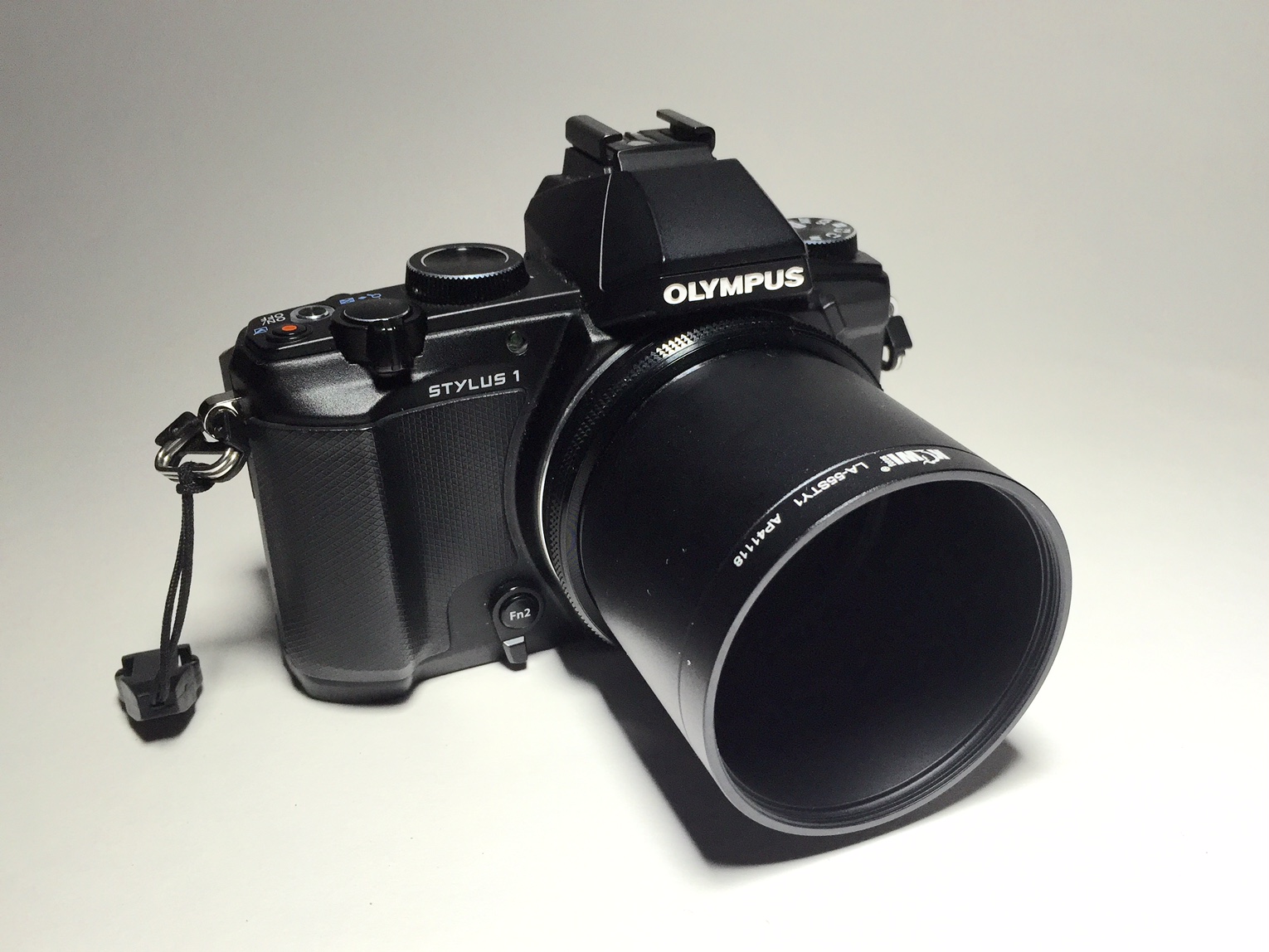 |
| Stylus 1 with adapter tube mounted |
Thursday, January 15, 2015
Olympus Upgrades Your Stylus 1 to a Stylus 1S* for Free!
 |
| Reciprocity. Stylus 1 |
Today, Olympus announced a major firmware upgrade for the Stylus 1. The firmware upgrade gives the Stylus 1 the same functionality as the Stylus 1S*, including:
- the focal length now shows the 35mm equivalent focal length instead of the silly zoom magnification (WOOHOOOOO!!!!). Alternatively, you can display the actual focal length (e.g. 6mm at the widest), or stay with the zoom magnification.
- a 9-step zoom to switch between popular focal lengths (YES!!!!). The focal lengths for the step zoom are: 28, 35, 50, 70, 85, 100, 135, 200, 300. Note that the Stylus 1 has two zoom levers: the one near the shutter and the other one on the side of the lens. You can choose to assign the step zoom to one or the other or both.
- focus peaking for manual focus (Awesome!)
- a smaller AF point is now available for more precise focusing
- interval shooting (potentially useful also for family portraits...)
- time lapse mode
- compatibility with a new wide angle converter (WCON-08X) that gives the Stylus 1 a 22.4mm equivalent focal length at its widest setting, still at f/2.8.
- compatibility with the O.I.Share app v. 2.5 (for remote shutter release via your smartphone's wifi)
*no free grip though. :)
These are seemingly small but very useful improvements to an already good camera. You can update the firmware through the Digital Camera Updater. Thanks for listening to your users, Olympus!!!
CAUTION: updating the firmware will delete all your custom settings (similar to resetting it to factory defaults).
I shot with the Stylus 1 quite a bit lately and will be posting about those shots soon.
CAUTION: updating the firmware will delete all your custom settings (similar to resetting it to factory defaults).
I shot with the Stylus 1 quite a bit lately and will be posting about those shots soon.
Subscribe to:
Posts (Atom)